Keck Medicine of USC

Improving the location search feature for USC's medical enterprise to help patients find specialized care close to home.
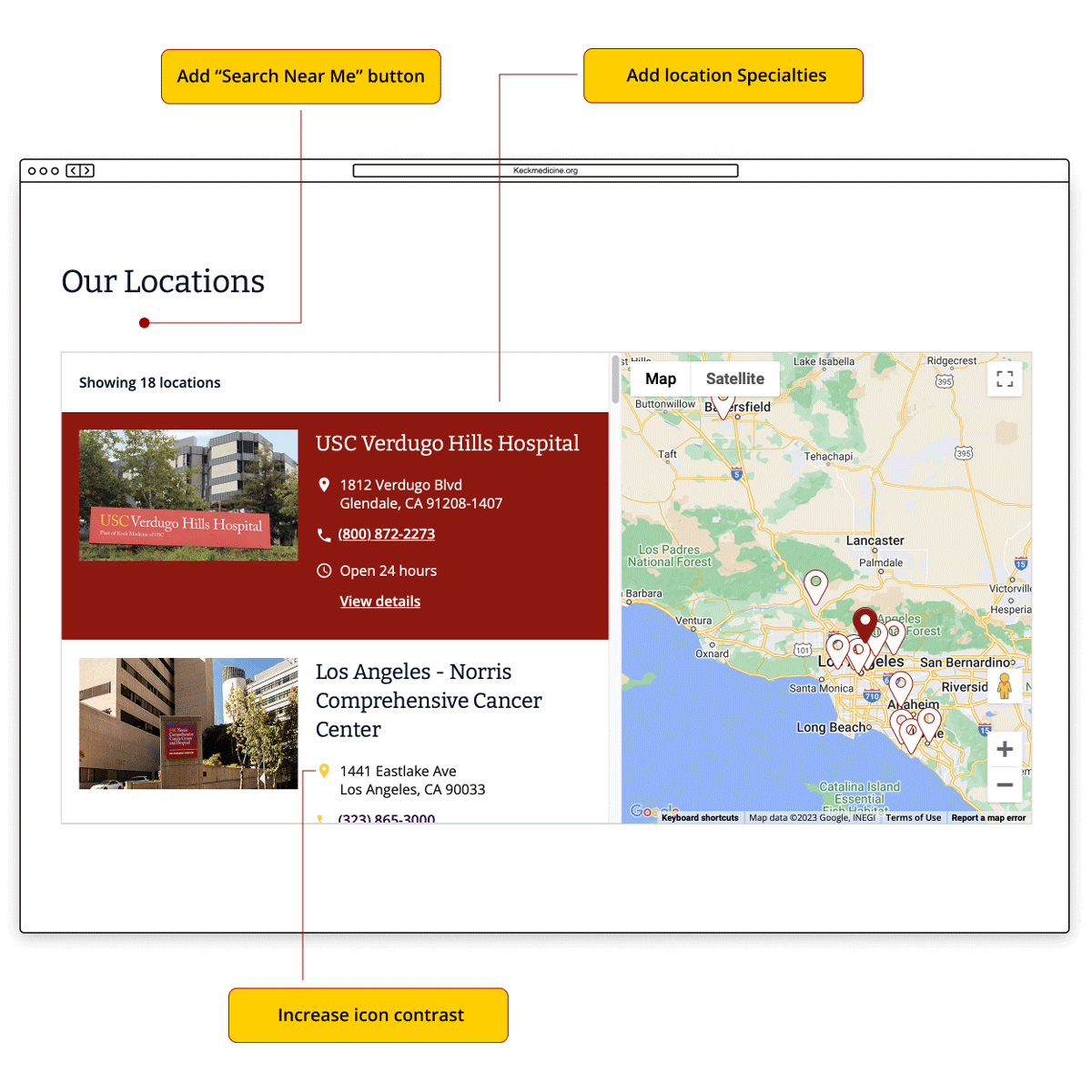
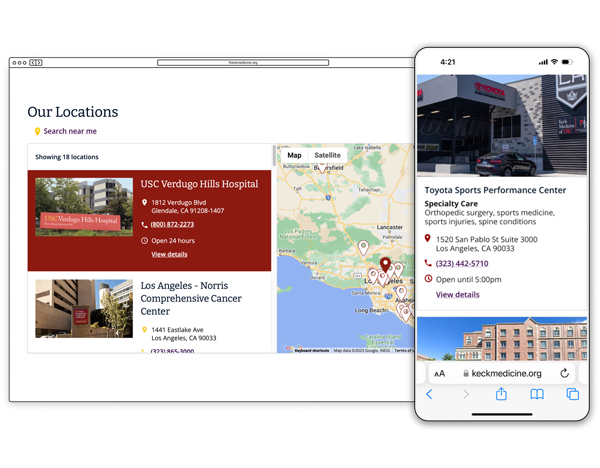
Screenshots of Keck Medicine of USC location search feature

Project type

Full-time employed

Team

Sr. Web Manager
Web producer
Developers
Stakeholders

My role

Heuristic Evaluation
User Research
UX/UI Design
Prototyping

Tools

Figma
Fig Jam
Whimsical

Duration

4 week design sprint

View Interactive Prototype →

Overview

Background

Keck Medicine of USC is the University of Southern California’s medical enterprise, combining best-in-class physicians, access to cutting edge research, and state-of-the-art facilities to provide highly specialized care for its patients.

The Challenge

Patients want to use KeckMedicine.org to find specialized care close to home. They need a user-friendly way to quickly filter through the many types of locations and specialties.

1) Current locations search feature does not easily allow patients to search close to home.

2) Current location directory tiles do not include location type and specialty.

The Task

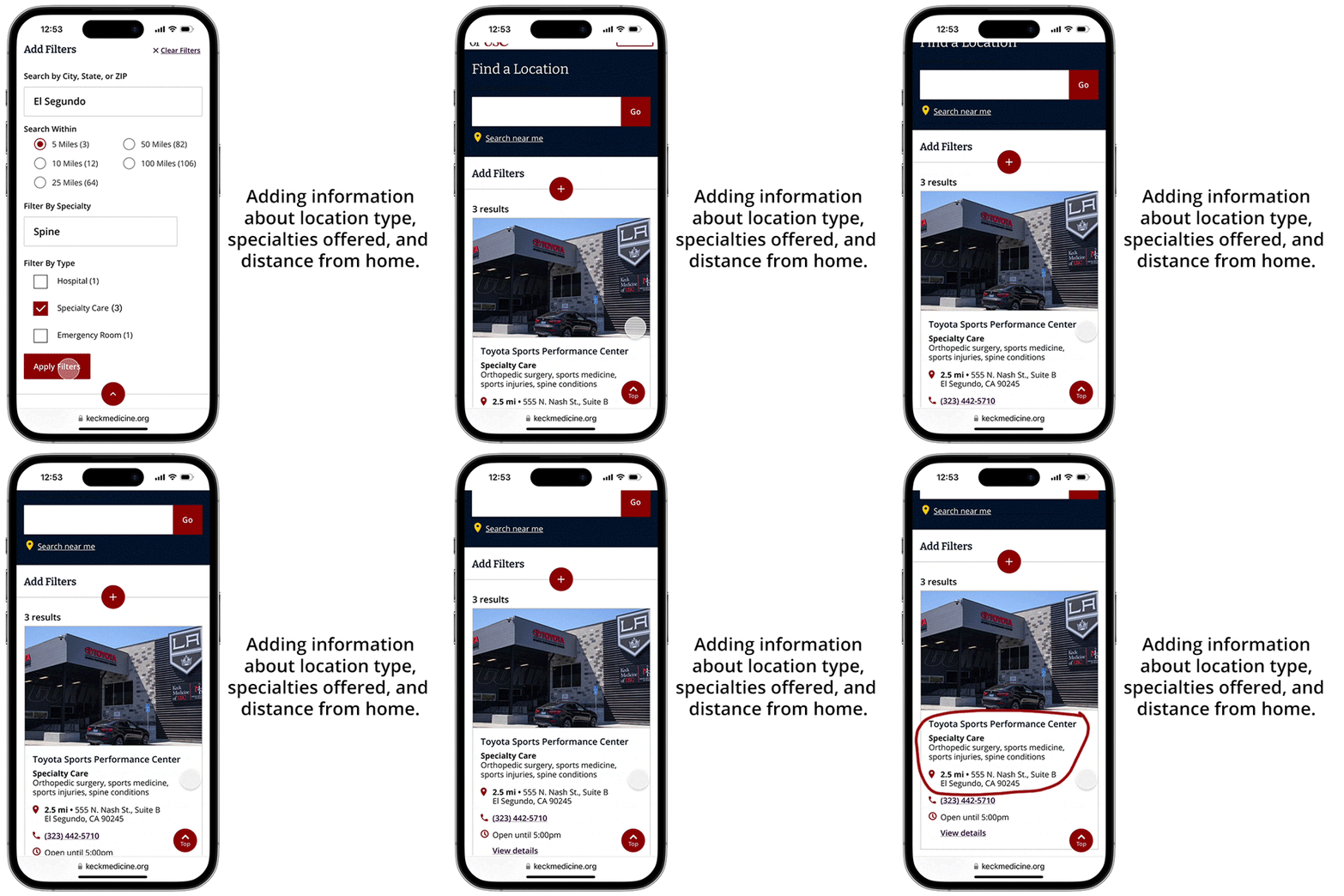
Evaluate location search filter and present recommendations for improvements. Optimize locations feed UI to provide patients with a more user-friendly search experience.

1) Enhance locations search UI to make it easier to search and filter locations close to home.
2) Enhance location directory tiles by adding location type and specialty.

Empathize

A middle-aged woman using her cell phone at home

Insights from Market Research

I reviewed healthcare consumer reports to learn how people are searching for locations to receive care. I also did a competitive analysis to examine the search features of other healthcare organizations.

What I discovered

Arrow pointing right towards text
Healthcare consumers want to use provider websites to search for locations close to home.
Arrow pointing right towards text
Every year, an increasing percentage of healthcare consumers are using mobile devices to search for care.
research icon
Key Finding #1
Consumers who rely on healthcare organization websites when searching for a provider
62%
Source: Kyruus' 2022 Annual Patient Access Journey Report
research icon
Key Finding #2
Consumers who leveraged “near me” or “near town/city” terms in their searches 
2in3
Source: Kyruus' 2022 Annual Patient Access Journey Report
research icon
Key Finding #3
Consumers who consider location extremely important when selecting a healthcare provider
77%
Source: Kyruus' 2022 Annual Patient Access Journey Report

Heuristic evaluation

Informed by the market research, I conducted a heuristic evaluation on desktop and mobile to measure the usability of Keck Medicine's search feature.

The heuristic evaluation was a valuable tool because it was fast and inexpensive, and helped identify flaws that were previously overlooked.

Key insight

Arrow pointing right towards text
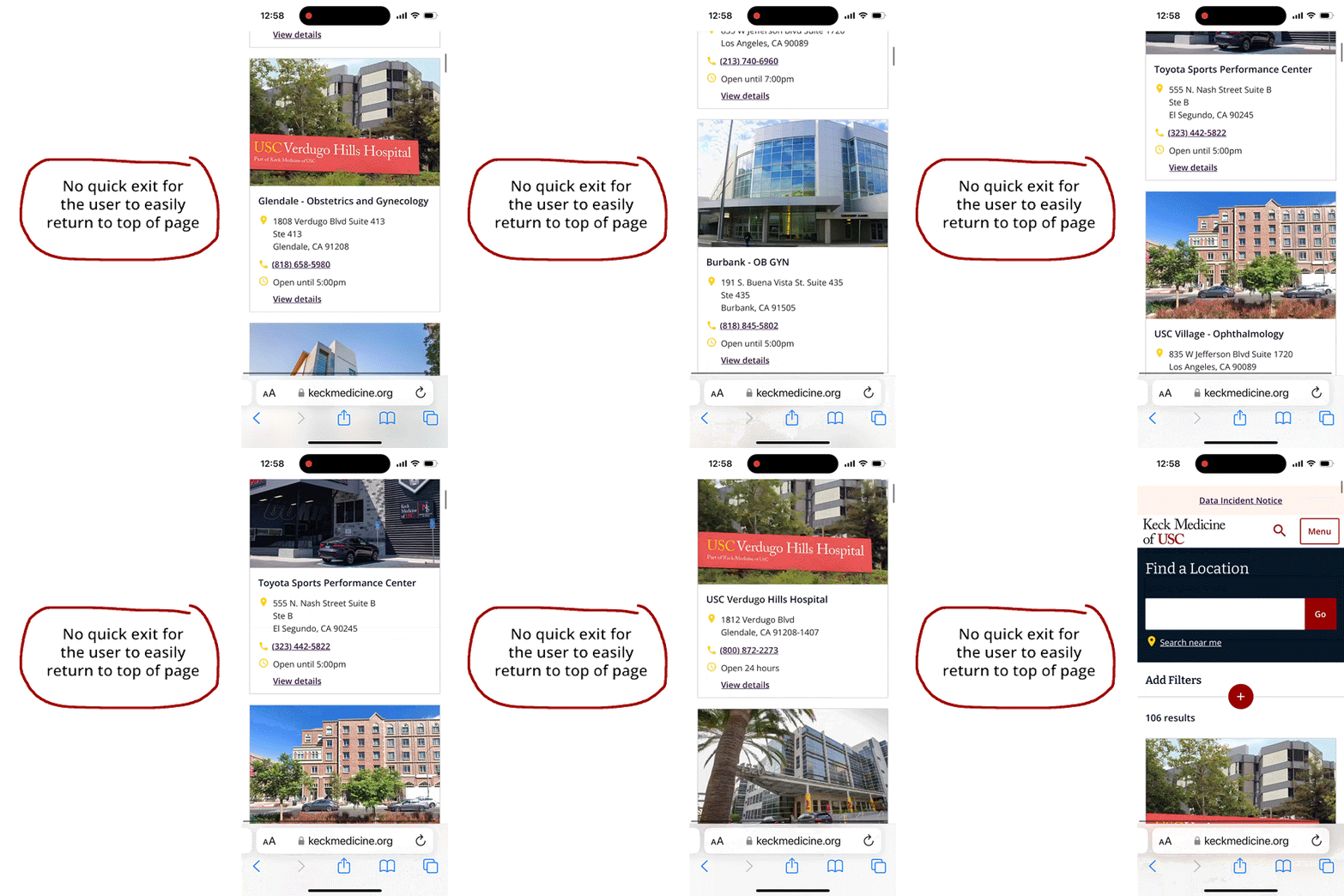
The mobile version of the website didn't have a clear way for users to search for care close to home using their location.
Flexibility and efficiency of use

No quick exit for the user

When scrolling through the locations on mobile, there’s currently no shortcut for the user to return to the top of the page. This can be an issue when browsing long lists.
Match between system and the real world

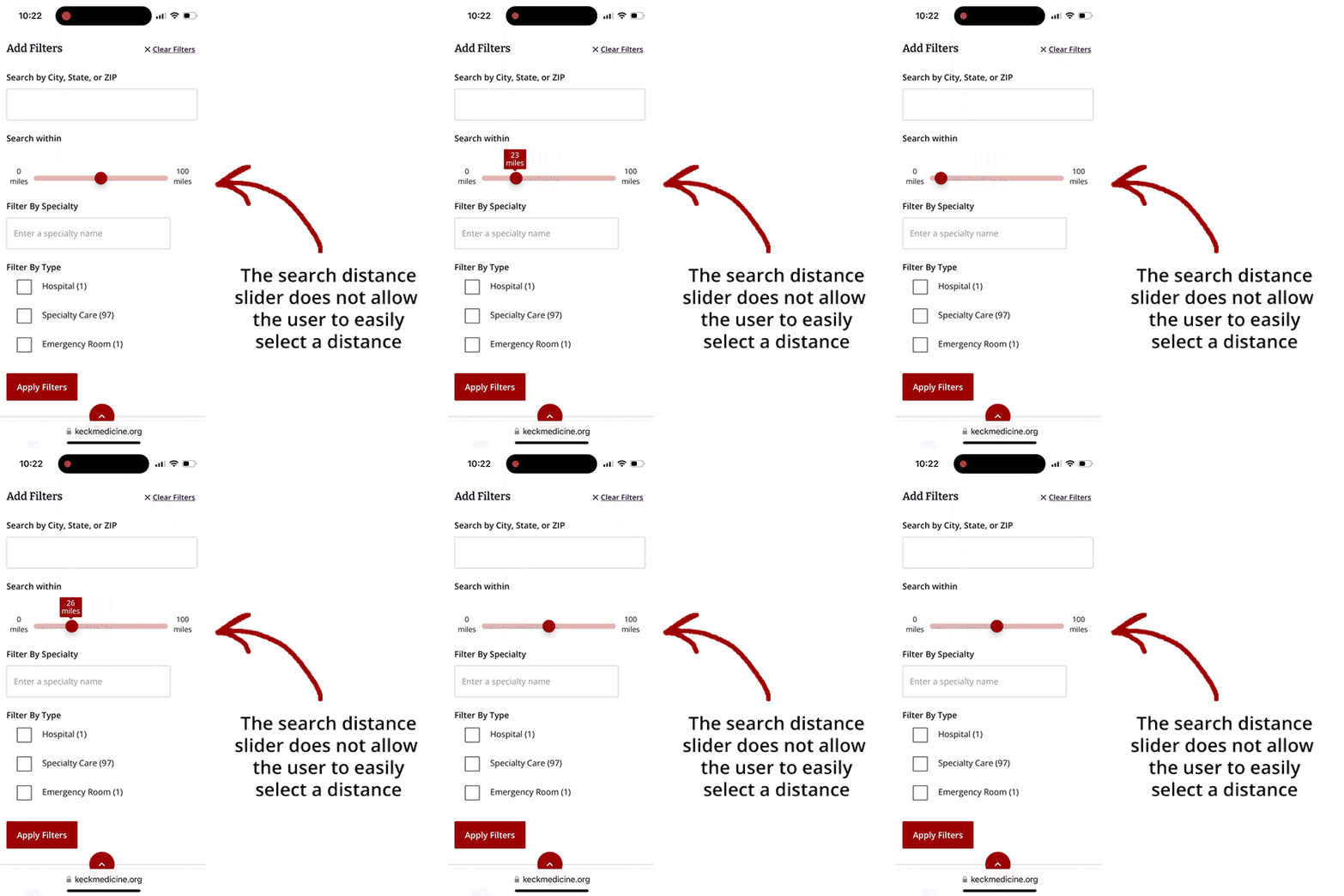
Location search distance has too many increments

The slider may confuse users with so many options and no indication of how many locations are available within each distance.
Aesthetic and minimalist design

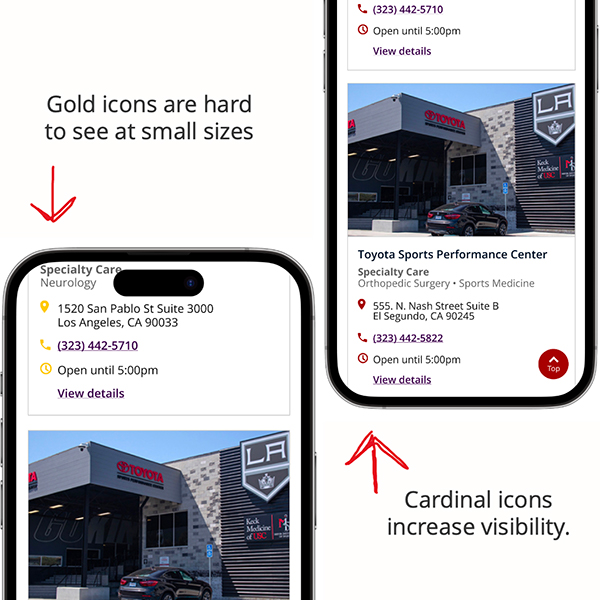
Not enough visibility on the icons

The gold icons on the white background may be hard to see at small sizes for some users.

Internal stakeholder interviews

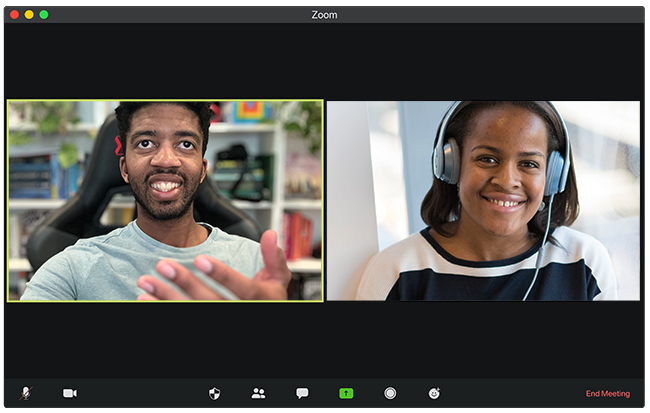
I presented the heuristic evaluation to internal stakeholders to share initial recommendations and get support to continue working on UX/UI enhancements.

Sharing a visual story with the data helped me get face-to-face time with the web team to learn how to support their strategic marketing goals.

Research objectives

Arrow pointing right towards text
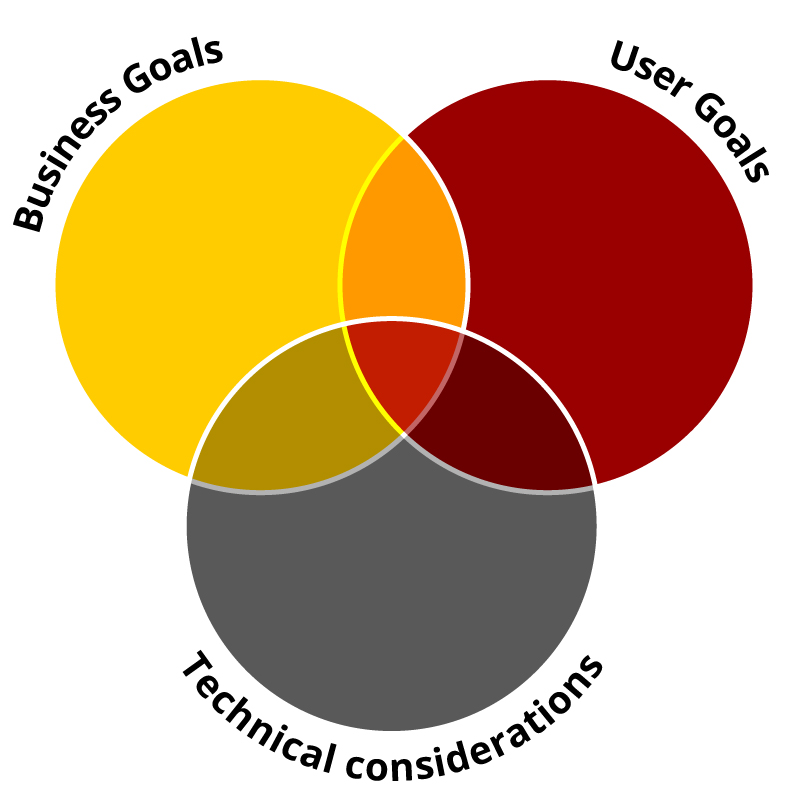
Understand the business goals for updating the search feature
Arrow pointing right towards text
Understand the technical considerations and development limitations
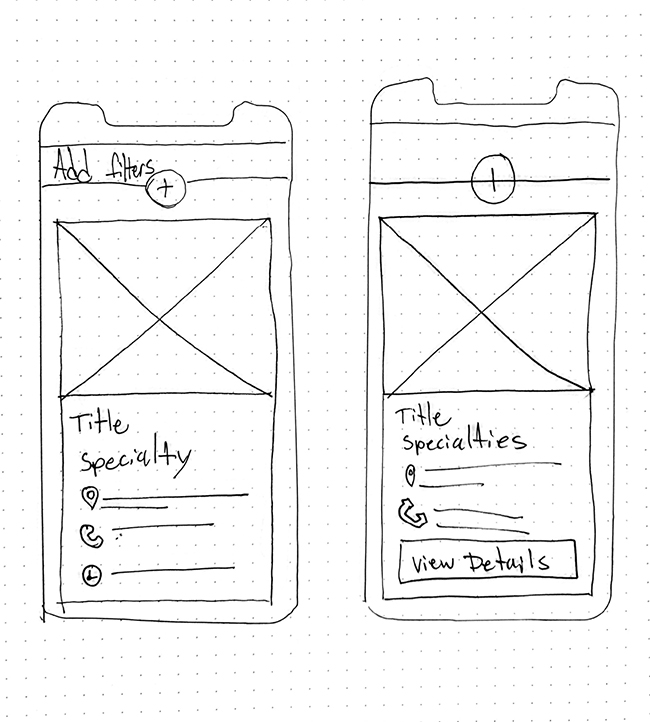
Sketch of mobile wireframes for Keck Medicine location search feature

User interviews

I interviewed healthcare consumers in Keck Medicine's primary service area to gain insights on what matters most when choosing a location to receive care.

Research objectives

Arrow pointing right towards text
What's most important to users when choosing a location to receive care.
Arrow pointing right towards text
Discover any pain points or obstacles that prevent users from finding a location that's convenient.

Define

Business Goals &
Technical Considerations

Insights from stakeholder interviews

Business goals

Arrow pointing right towards text
Drive growth and revenue for the health system through increased appointments
Arrow pointing right towards text
Increase patient satisfaction

Technical considerations

Arrow pointing right towards text
The new search features needed to adhere to the current design system and branding guidelines
Arrow pointing right towards text
Design recommendations needed to be completed within 4 weeks.

Insights from User Interviews

I used the atomic research method to synthesize my research into facts, insights, and opportunities.

Design Opportunity

Arrow pointing right towards text
How might we empower healthcare consumers to find specialized care close to home?
Atomic Finding #1
research icon
Fact (what we heard): "With Blue Shield I couldn't change my location, and that's what made it really inconvenient for me. I just opted not to go."
- user interview quote
define icon
Insight (what we learned):Users expect the freedom to choose a location that works for them, and they may cancel an appointment that's not convenient.
ideate icon
Opportunity (how we can improve):Quickly provide users with location options so they can choose what works best for them.
Atomic Finding #3
research icon
Fact (what we heard): "The first thing I look at is where it is at, and then how is the experience with the doctors"
- user interview quote
define icon
Insight (what we learned):Location is top of mind for users, but they also want to know what the doctors are like before making an appointment.
ideate icon
Opportunity (how we can improve):Make it easy for users to learn about the doctors who practice at each location.
Atomic Finding #2
research icon
Fact (what we heard): "I go with whatever is closest, whatever is available. I don't want to go out of my way or out of my schedule to take care of health issues"
- user interview quote
define icon
Insight (what we learned):Users want their health care to fit into their busy schedules. They expect care close to home, and they want to see a doctor on their timeline.
ideate icon
Opportunity (how we can improve):Make it easier for users to find a location close to home to fit into their busy lives.
Atomic Finding #4
research icon
Fact (what we heard):Having to pay out out pocket for an appointment he thought would be covered under his insurance was a major pain point.
define icon
Insight (what we learned):Users are frustrated by a lack of information about insurance coverage. They want to know upfront if their insurance will be accepted.
ideate icon
Opportunity (how we can improve):Provide users with clear, easy to access information about accepted insurances.

User Journey Map

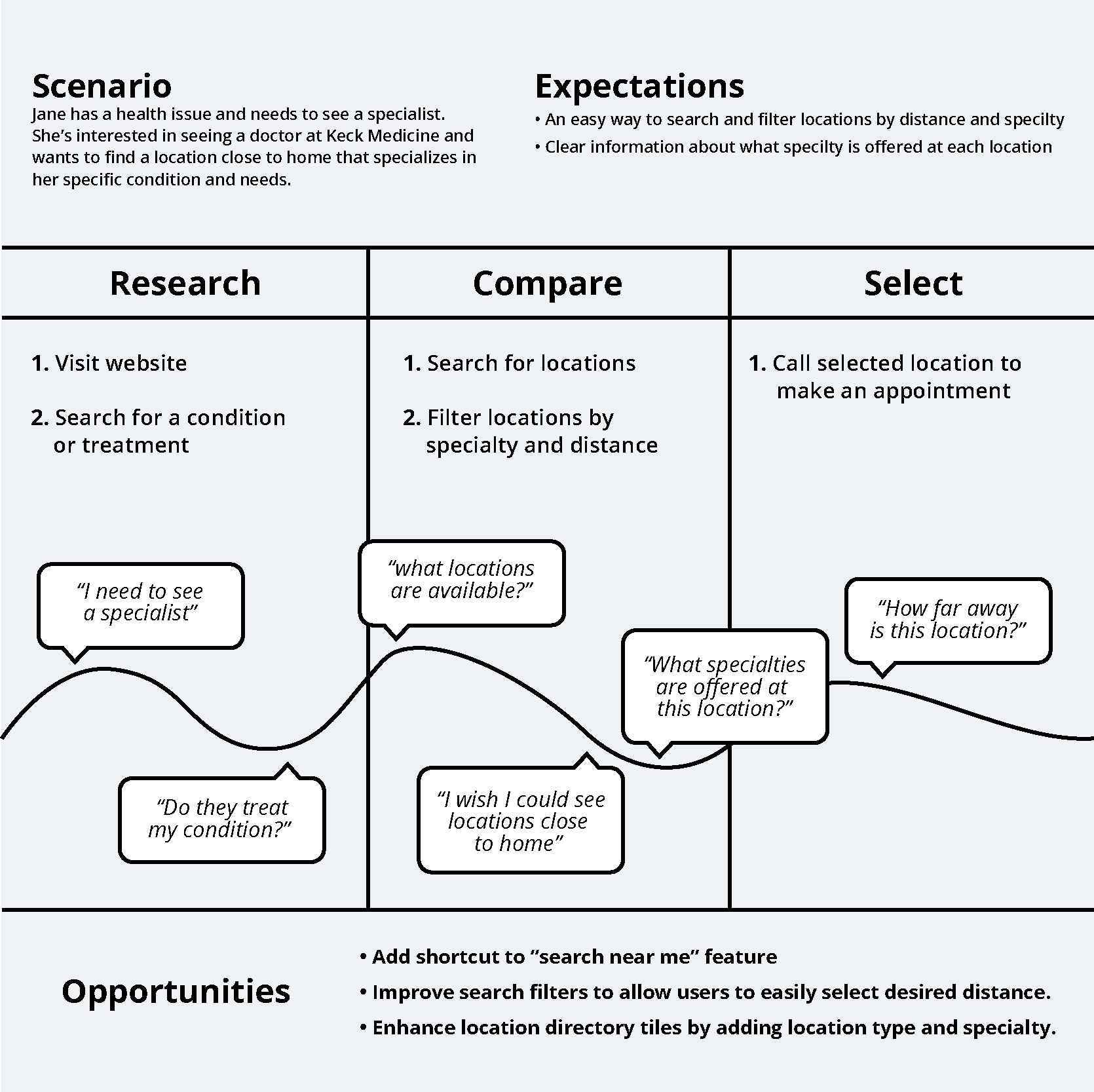
I created a user journey map to illustrate the user's mindset, actions and emotions. It demonstrates how users search for a location and the pain points and frustrations they may experience along the way.

The journey map revealed key opportunities on how to improve the user experience.

Ideate

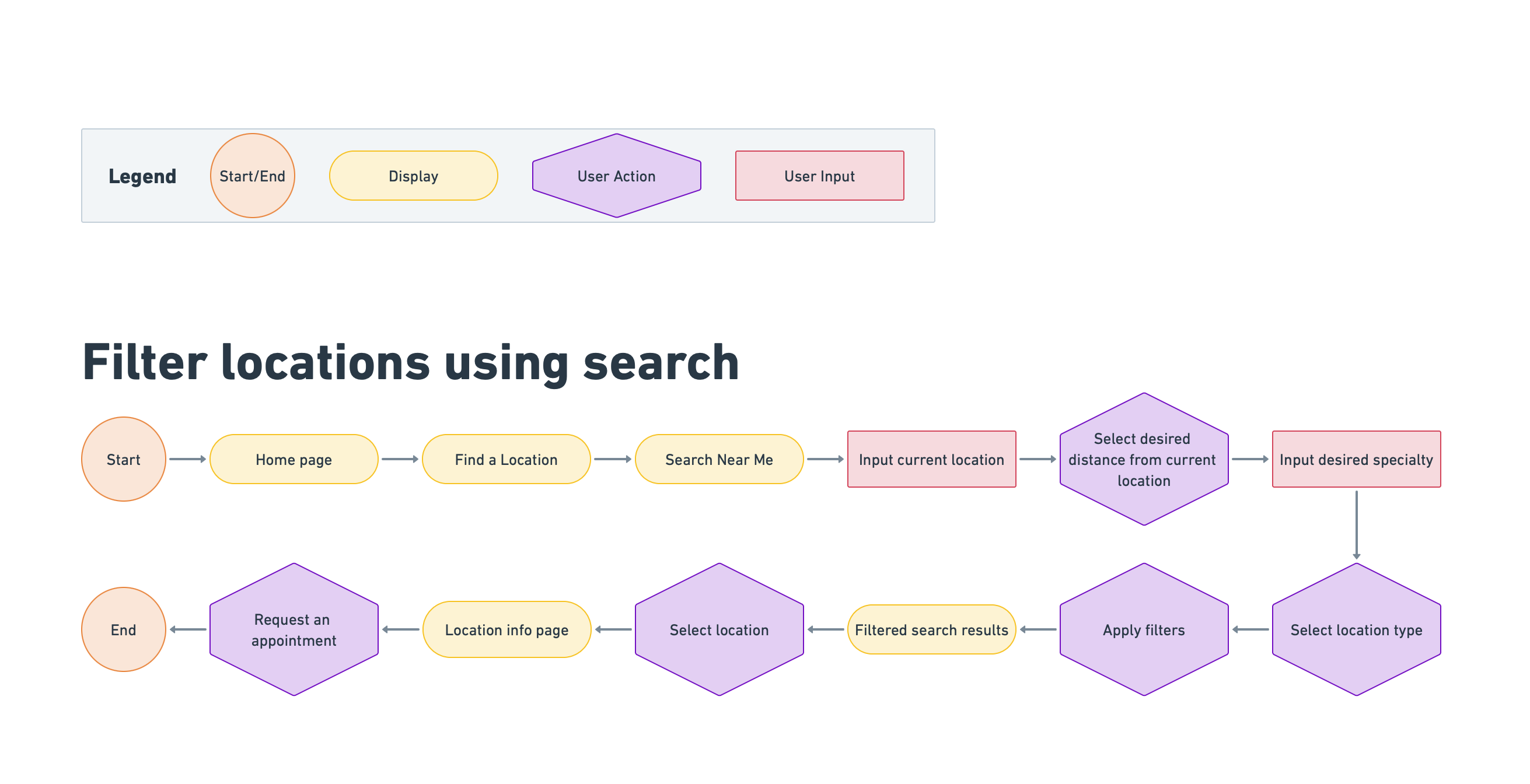
User & task flows

I used my research findings to explore ways to improve the location search feature, while working within Keck Medicine's existing design system.

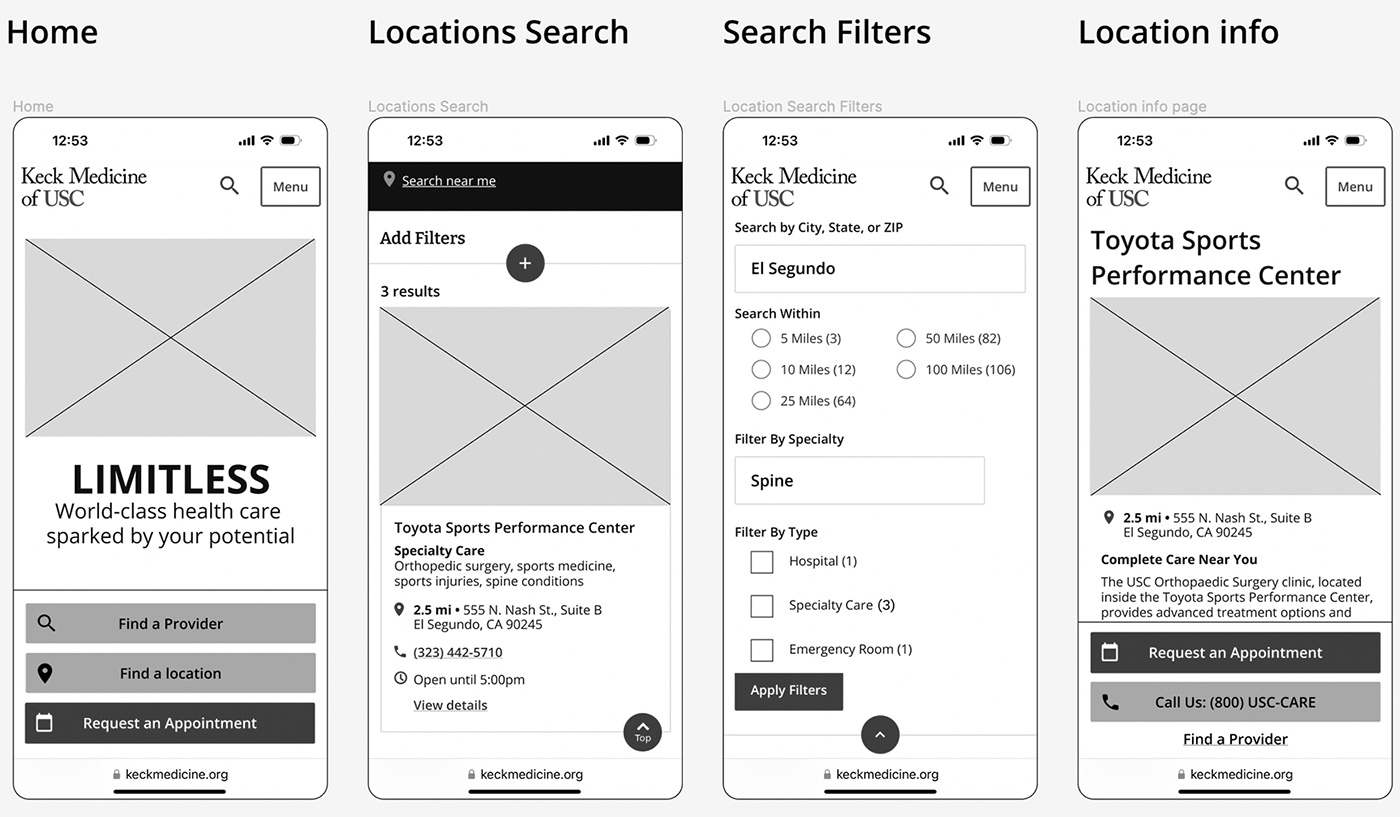
Wireframes

After determining the overall structure and flow of the website, I created wireframes to develop a blueprint of the search feature.
Sketches of key screens for the search feature

Prototype

High fidelity prototype

I created a high fidelity prototype to test with users.

Research Goals for usability testing

Arrow pointing right towards text
Evaluate if users are able to easily search for a location and filter results, following the intended user journey.
Arrow pointing right towards text
Identify any pain points or confusion with the location search feature.
Usability testing was essential to validate my ideas and identify errors before development.

Business goals for usability testing

Arrow pointing right towards text
Save money by validating designs before development.
Arrow pointing right towards text
Save time by finalizing designs before handoff to developers.
Arrow pointing right towards text
Get buy-in from key stakeholders.
Flexibility and efficiency of use

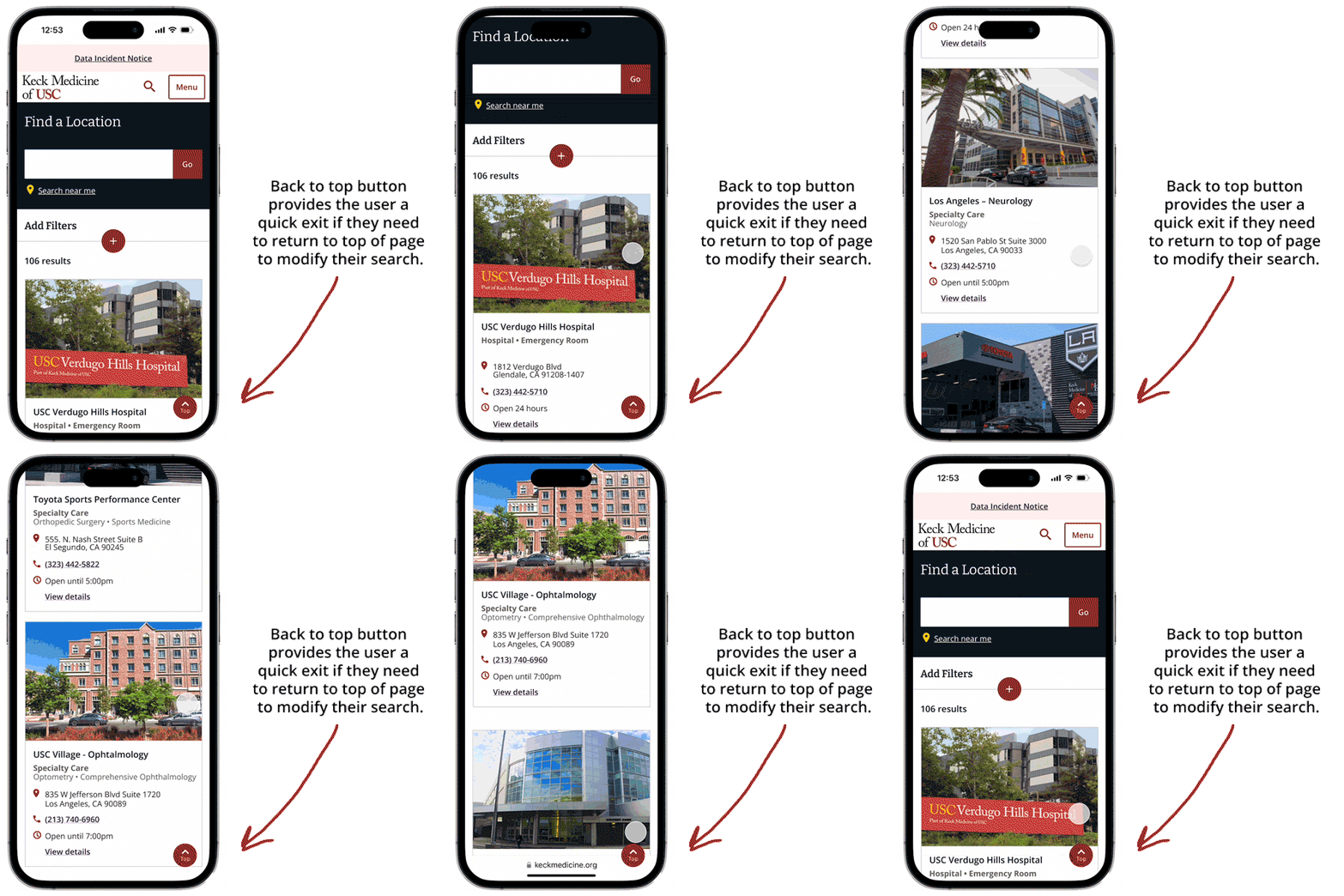
Add back to top feature

In my prototype, I recommended adding a scroll “back to top” button for flexibility and efficiency of use.
Match between system and the real world

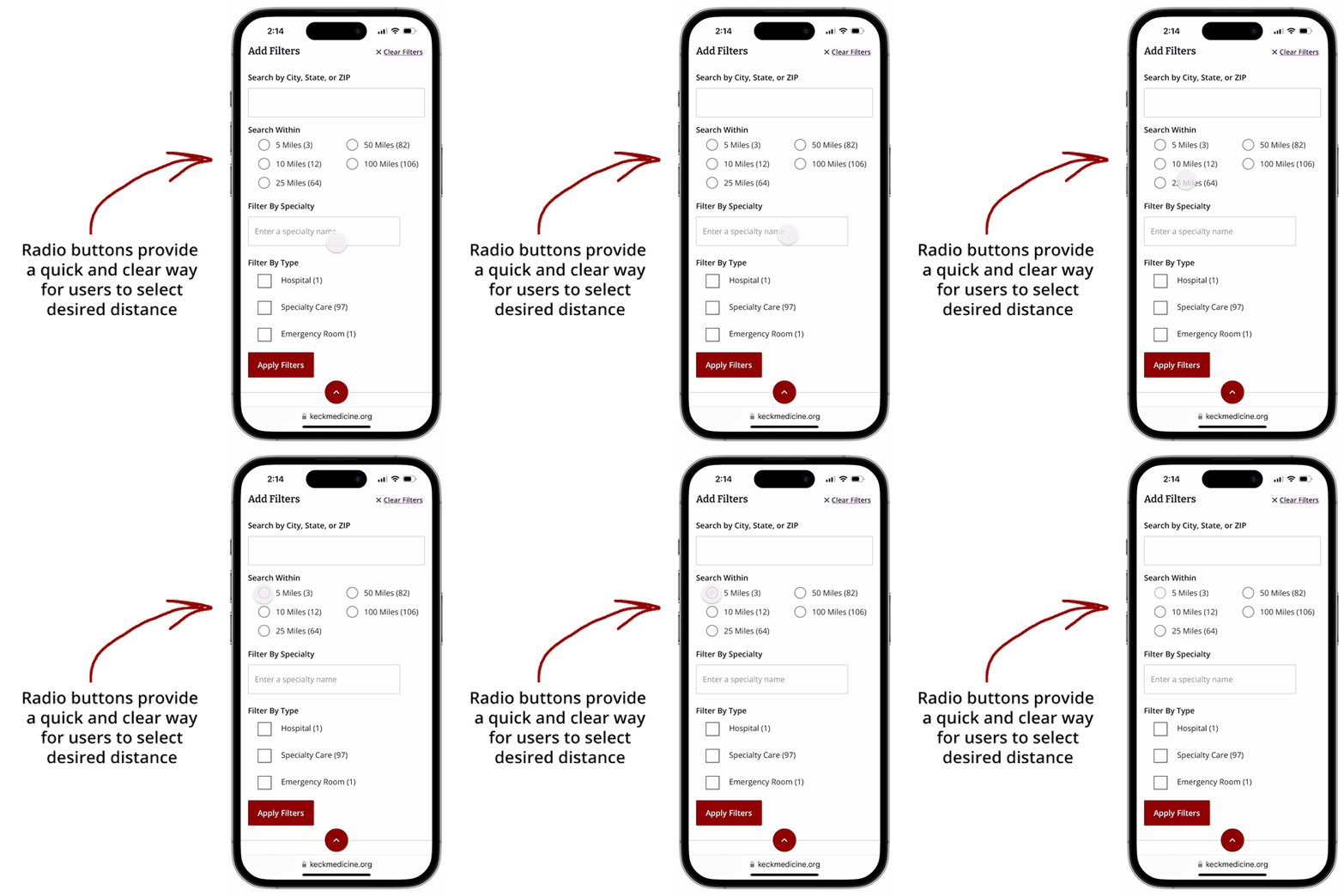
Add standard distance options

I recommended adding a way for users to easily select 5, 10, 25 and 50 miles increments, and to let users know how many locations are available within each distance.
Visibility of system status

Add information about location type, specialties and distance

In addition to clear information about the services offered at each location, I recommend adding an indication of how far the location is from city or zip code entered by the user. This could keep the user informed about each location during their search.

Test

Usability testing

Usability testing allowed me to collect feedback directly from users in real time.

Success Metrics

Check mark
Success rate (if users can successfully find and select a location)
Check mark
Time it takes to find and select location
Check mark
Error rate (how many times users experience an error)
Check mark
Users' subjective satisfaction (do users feel it’s useful and easy to use?)

Analyzing test results

Key outcomes

Arrow pointing right towards text
Success rate5 of 5 users could successfully search and filter locations by specialty and distance
Arrow pointing right towards text
Time5 of 5 of users could find a location within 2 mins — the average time spent on healthcare websites
Arrow pointing right towards text
Error rate2 of 5 users experienced a navigation error due to lack of back button on appointment request page
Arrow pointing right towards text
User satisfaction5 of 5 users felt the search feature was helpful and easy to use. However, they shared feedback on things that would make their experience better.

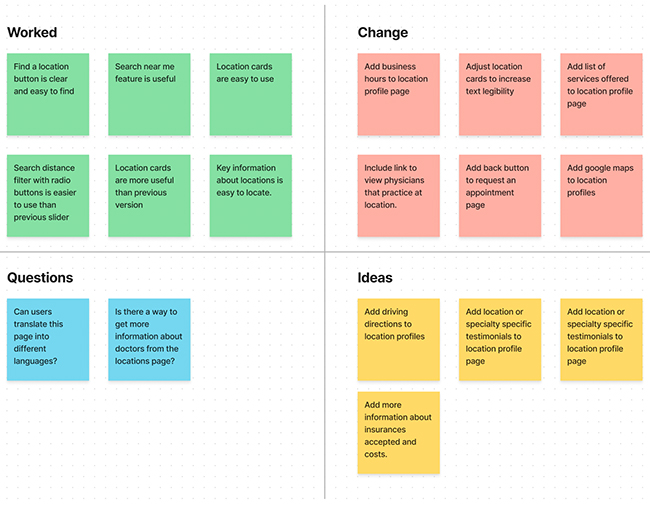
Feedback from usability testing

Prioritizing feedback

alert circle
Design insight #1

Users want to see a map view of locations, and have a link to directions.

alert circle
Design insight #2

Users want more information about the insurance accepted at each location.

alert circle
Design Insight #3

Users want to know more information about the doctors who practice at each location.

alert circle
Design Insight #4

Users need a way to return to search results from the appointment booking page.

Iterate

Priority revisions

Iterating based on user feedback

Check mark
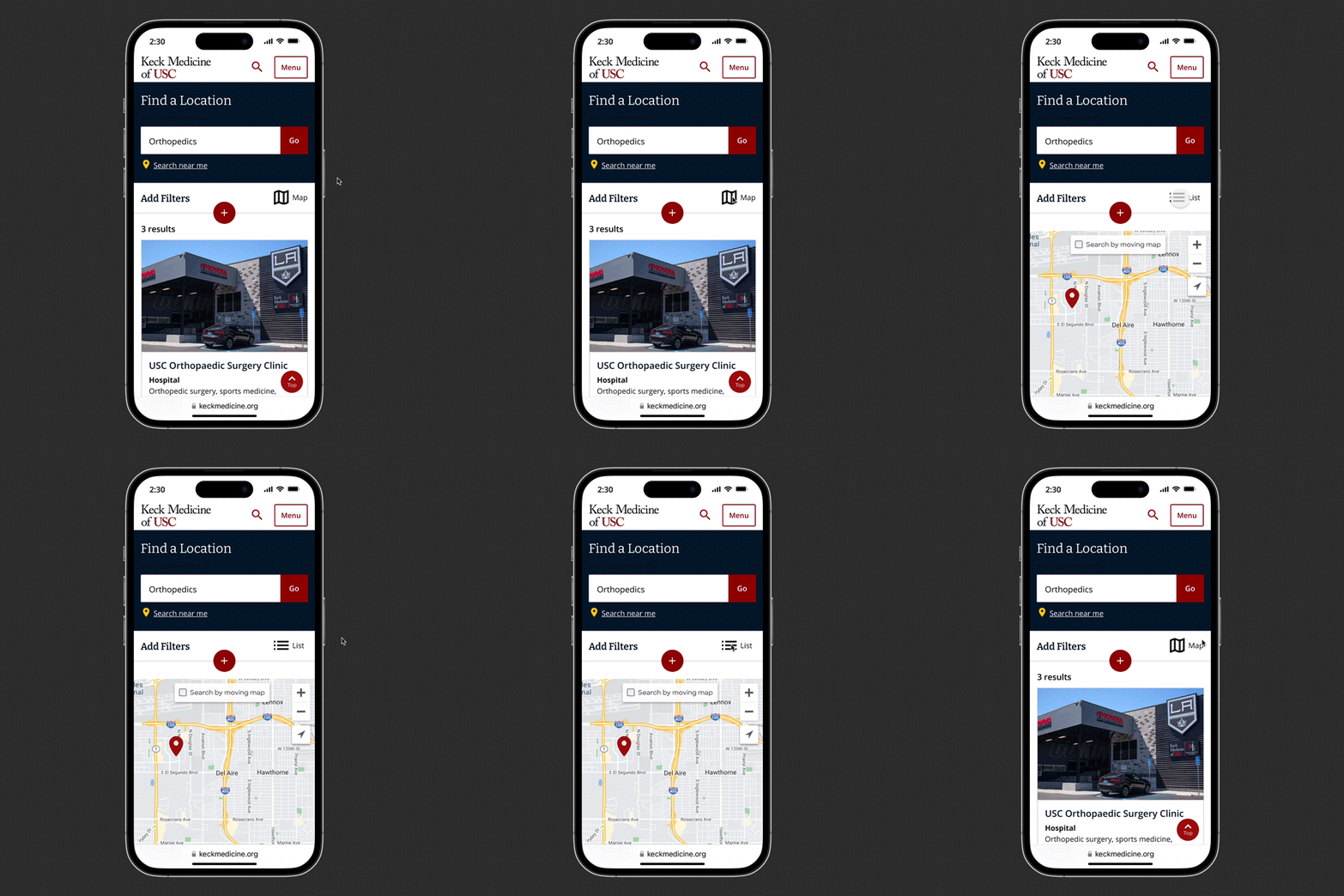
Added map view to location search results, giving users flexibility to toggle between map and list views.
Check mark
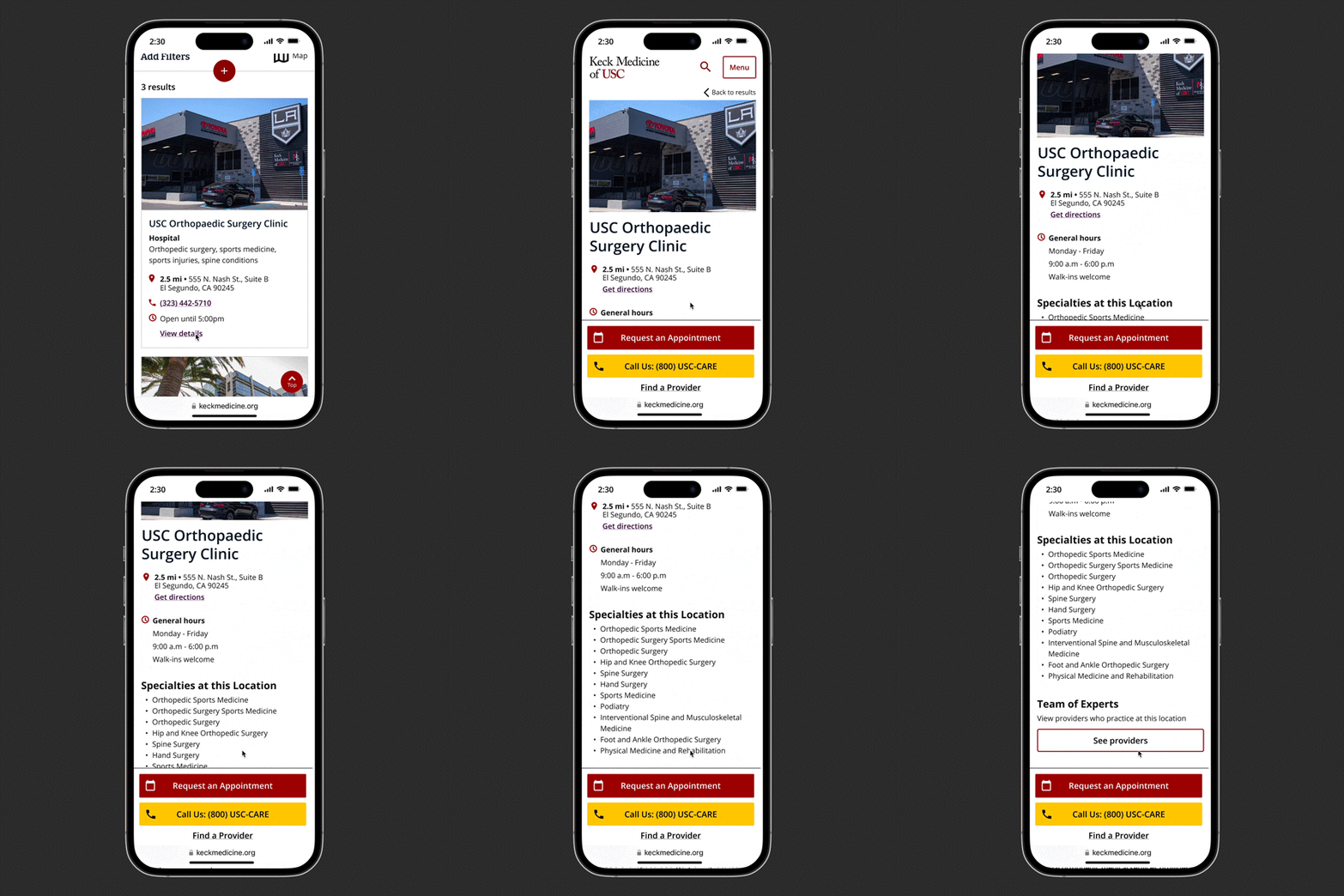
Added “get directions” link to location profile page
Check mark
Added link on location profile page to view providers who practice at that location
Check mark
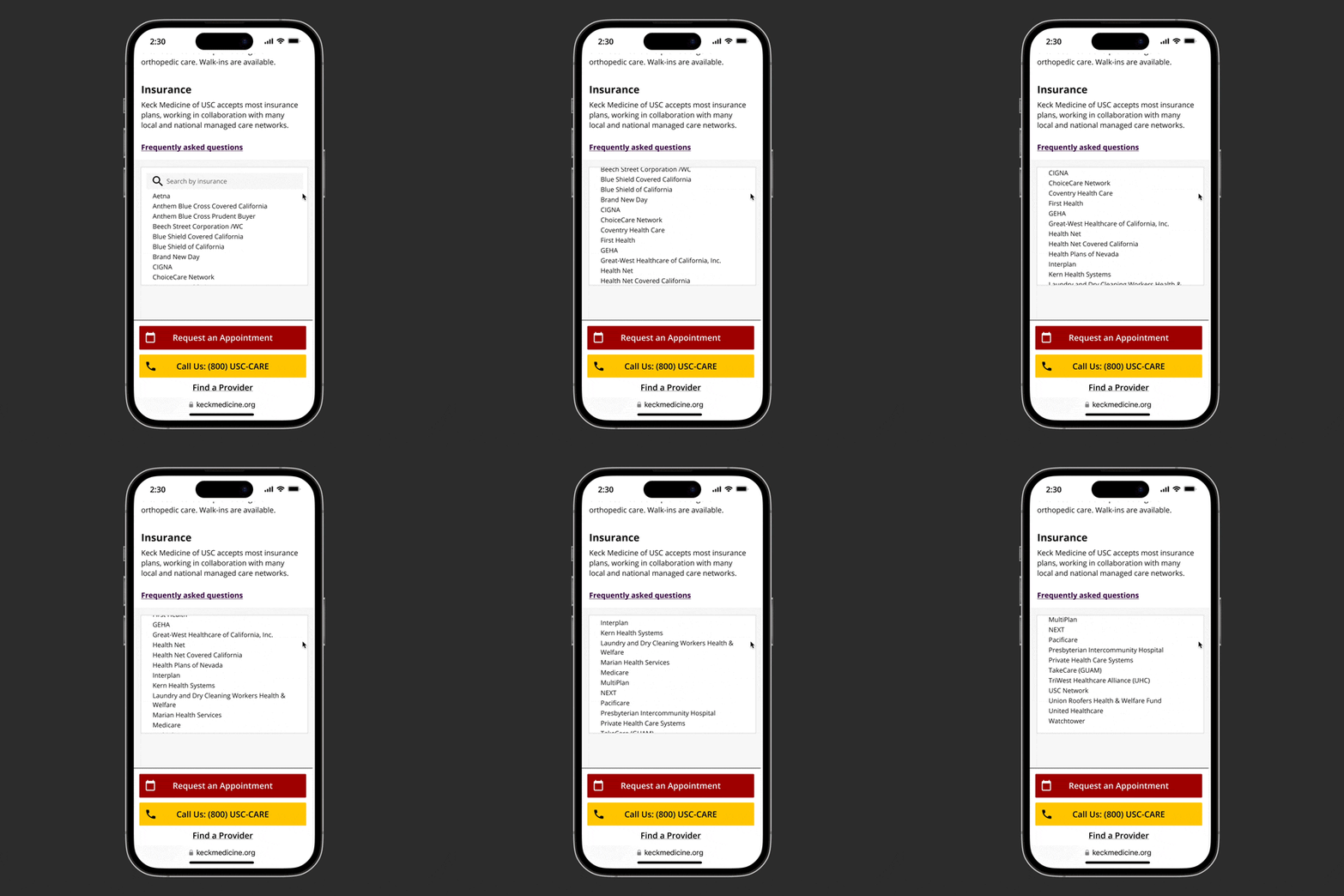
Added accepted insurance section to location profile page
Check mark
Added a back button on the request an appointment page to allow increased freedom and control.

Final prototype

View interactive prototype in Figma

View Interactive Prototype →

Next Steps

What I Learned

Key insights from the project

Arrow pointing right towards text
Healthcare consumers expect convenient care close to home. They want to find a location online and learn about the specialties, doctors, and insurance accepted before making an appointment.
Arrow pointing right towards text
Making it easier for healthcare consumers to find and filter locations close to home can increase appointments and improve customer satisfaction.

Challenges

Arrow pointing right towards text
Key information about locations, doctors and insurances are stored in different databases with limitations on how the data can be displayed.
Arrow pointing right towards text
It was challenging to design within the technical contriants of the databases and design system.

Next steps

Arrow pointing right towards text
The next step is to work with the web team to implement the new search feature enhancements, and monitor the results to determine the impact to the business goals and user goals.

Want to discuss this project?
I'd be happy to connect with you!

View next case study →

Screenshots of USC TeleCARE app